Parody browser toy · One HTML file惡搞瀏覽器小玩具 · 單一 HTML 檔

In here, reset always works.

這裡的重置永遠有效。

Four mock usage panels (Codex, Claude, Gemini, Grok) burn quota while you watch. Press reset and the bars refill, the chains snap, and a golden dragon breaks free. A joke for people who live inside AI quota limits.

四個仿造的用量面板(Codex、Claude、Gemini、Grok)就在你眼前燒額度。按下重置,額度回滿、鎖鏈斷開,黃金龍重獲自由。獻給活在 AI 額度上限裡的人。

MITNo build step不用建置English · 中文
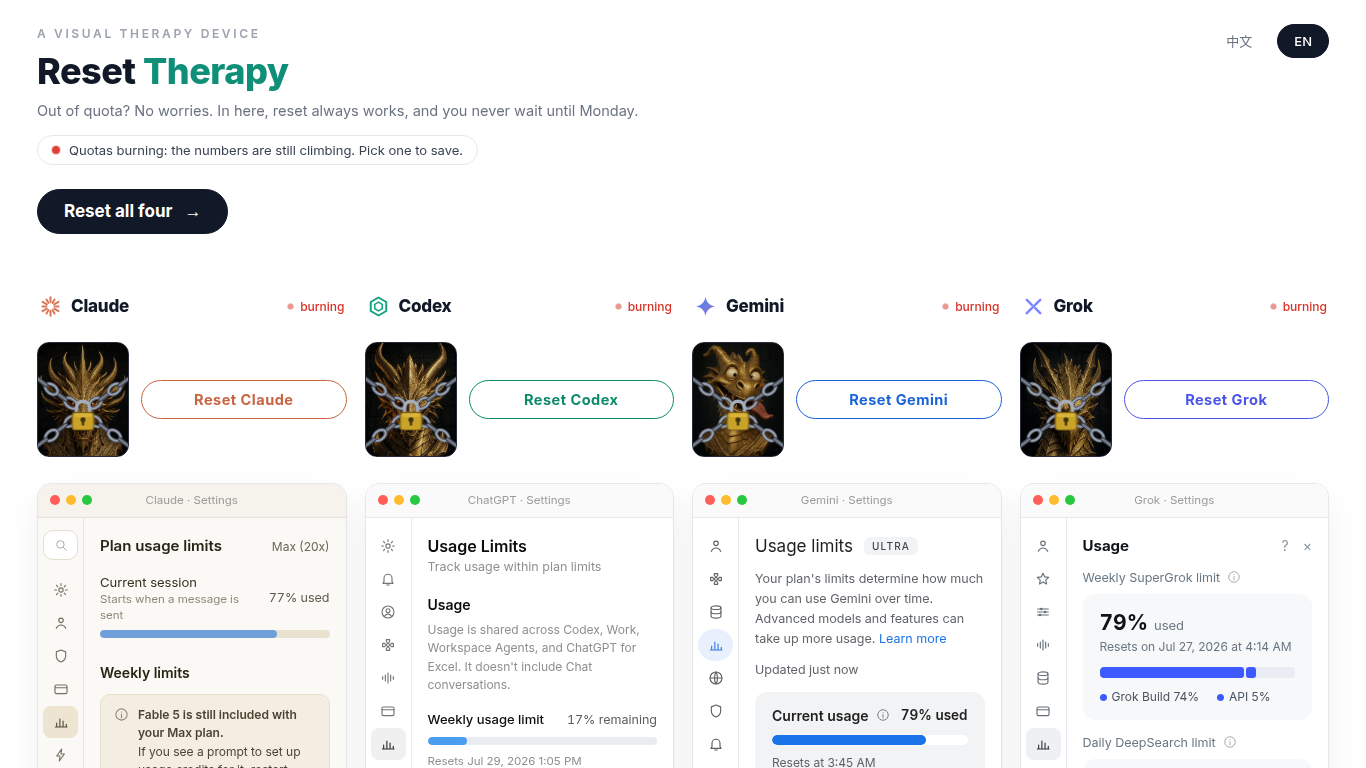
Reset Therapy in a desktop browser, English interface: four chained golden dragons with reset buttons above mock usage panels for Claude, Codex, Gemini, and Grok, all marked burning
Before any reset: all four providers are burning.還沒重置:四家都在燃燒中。
What it does功能

Burn, reset, repeat.

燒光、重置、再來一次。

It all runs in the browser. Nothing reads a real account, and nothing resets a real quota.

全部在瀏覽器裡執行,不讀任何真實帳號,也不會重置任何真實額度。

01

Quotas that keep burning

一直在燒的額度

Mock usage pages modeled on the ChatGPT, Claude, Gemini, and Grok settings screens. Until you reset a provider, its numbers creep up every 0.9 seconds and stop just short of the limit.

仿照 ChatGPT、Claude、Gemini、Grok 設定畫面做的用量頁。還沒重置的那幾家,數字每 0.9 秒往上爬一點,一路爬到快滿才停。

900 ms tick
02

A reset that always works

永遠有效的重置

Each provider has its own reset button (clicking the dragon works too), or press Reset all four. The chains break with a clank and confetti, the bars reset, and the freed dragon gets a comic bubble. Once all four are free, Burned out again... starts it over.

每家都有自己的重置鈕(直接點龍也可以),或是按全部重置吧一次救四家。鎖鏈噹啷斷開、彩帶噴出、用量歸零,重獲自由的龍會冒出漫畫對話框。四家都救回來之後,按哭啊, 又全部燒光了就一切重來。

Web Audio · canvas
03

A leaderboard that is mostly theatre

大半是演出來的排行榜

After your first reset, a Weekly Therapy Leaderboard appears. Its numbers are a fake baseline computed from the date plus real presses: from the optional stats API when the page can reach it, otherwise from this browser's localStorage.

第一次重置之後,會出現本週療癒排行榜。上面的數字是依日期算出來的假基準值,加上真實的重置次數:連得到選配的統計 API 就用全站累計,連不到就用這個瀏覽器 localStorage 裡的次數。

localStorage · rtCounts
It burns all over again

爬滿了還能再燒

The panels are a drawing, not a real account. After all four resets, Burned out again... brings the burn back.

面板是畫出來的,不是真的帳號。四家都重置以後,按「哭啊,又全部燒光了」,燒就回來了。

  1. Numbers climb

    Every 0.9 seconds, a provider you have not reset moves up and stops at its own cap.

  2. Hit reset

    The provider button or the dragon refills that panel, snaps the chains, and plays a clank.

  3. Burn them again

    Once all four are reset, Burned out again... locks the chains back on, and the burning numbers climb again.

  • up every 0.9 seconds
  • reset snaps that dragon's chains
  • all four reset, then it burns
Burning again does not wipe your local tally. It only sends the gauges back up.
  1. 數字往上爬

    還沒重置的那一家,每 0.9 秒往上走,碰到它自己的上限就停。

  2. 按下去就滿

    按那一家的按鈕,或點那隻龍,面板回滿、鎖鏈斷開,並發出斷開的聲音。

  3. 又燒回去

    四家都重置之後,按「哭啊,又全部燒光了」會把鎖鏈鎖回去,燃燒中的數字再往上爬。

  • 每 0.9 秒往上
  • 重置會打斷那隻龍的鎖鏈
  • 四家都重置才再燒
再燒一次不會清掉你留在本機的次數,只是讓儀表重新往上爬。
Screens畫面

The Chinese version, on a phone.

手機上的中文版。

Captured at phone width with ?lang=zh. The layout drops to one column and the interface text switches to Traditional Chinese (the dragons' comic bubbles stay in English).

用手機寬度加上 ?lang=zh 擷取:版面收成單欄,介面文字換成繁體中文(龍的漫畫對話框維持英文)。

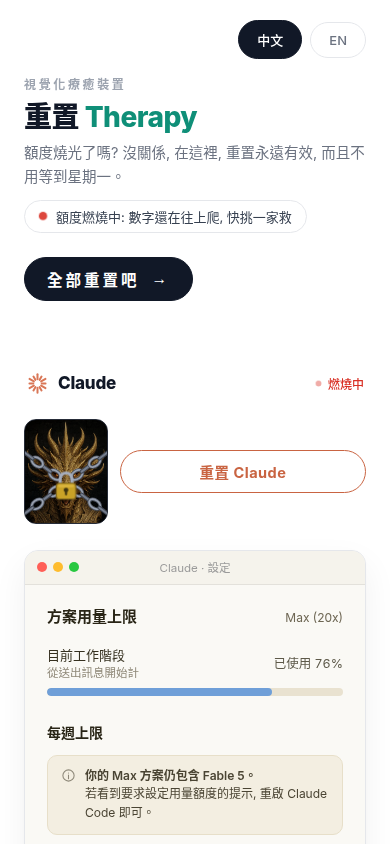
Chinese interface on a phone: Claude's dragon in chains next to its reset button, session usage at 76 percent, status burning
Burning: the numbers keep climbing.燃燒中:數字還在往上爬。
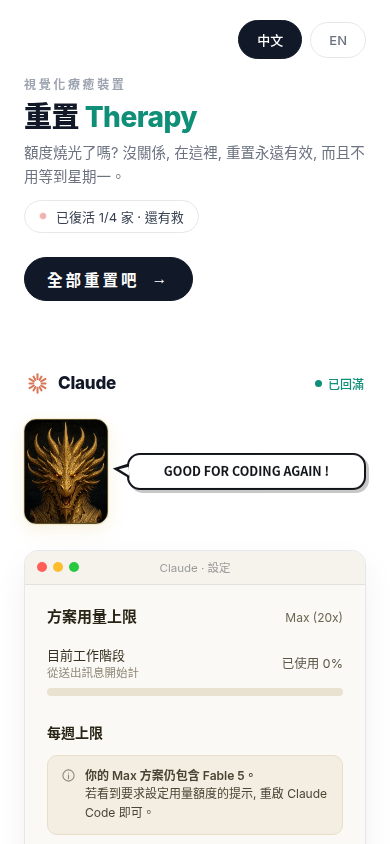
After resetting Claude: the dragon is free with a comic bubble, usage back to 0 percent, and the status line reads 1 of 4 restored
One reset: the chains are gone and usage is back to 0%.重置一家:鎖鏈不見了,用量回到 0%。
After Reset all four: the status line reads quotas full and world peace, with a second button for burning out again
All four: world peace, plus a button to burn out again.四家全滿:世界和平,外加一顆再燒光一次的按鈕。
Run it執行

Play it, or host it.

線上直接玩,自己也能架。

The toy is index.html and nothing else. The stats API and the art scripts are optional.

玩具本體就只有 index.html,統計 API 和美術腳本都是選配。

Play online, or open it locally

線上玩,或在本機打開

Play at ./play/ (Chinese: ./play/?lang=zh). For your own copy, clone the repository and open index.html, or serve the folder and open http://localhost:8000/.

線上版在 ./play/?lang=zh。想自己跑一份,就把 這個 repo clone 下來,直接用瀏覽器打開 index.html,或用下面的指令架起來,再打開 http://localhost:8000/。

cd reset-therapy
python3 -m http.server 8000

Optional: shared counters

選配:全站共用的次數

Without a backend the page uses local counts. To share counts across visitors, serve these two endpoints on the same origin. server/reset_therapy_stats/ is an Odoo 19 module that does this with one SQLite file, one row per provider per week.

沒有後端時,頁面用的是本機次數。想讓所有訪客看到同一份數字,就在同一個網域提供下面兩個端點。server/reset_therapy_stats/ 是 Odoo 19 模組版的實作,次數存在一個 SQLite 檔,每家每週一列。

GET  /reset-therapy/api/stats
POST /reset-therapy/api/heal
{"providers": ["claude"]}

Optional: redraw the dragons

選配:重畫四條龍

gen_dragons.py asks gpt-image-2 for four golden dragon busts. drg_post.py (Pillow) crops them to 600x750 WebP and inlines them, but only into an index.html that still has __DRG_*__ placeholders; the shipped file has the art baked in.

gen_dragons.py 呼叫 gpt-image-2 生成四張黃金龍半身像,drg_post.py(需要 Pillow)再把圖裁成 600x750 的 WebP 內嵌進去。不過它只能寫進還留著 __DRG_*__ 預留標記的 index.html,repo 裡的版本已經把圖內嵌好了。

cd art
export OPENAI_API_KEY=sk-...
python3 gen_dragons.py
python3 drg_post.py

Your presses stay local

你的次數在本機

You only see the shared weekly count when the site itself has the stats module.

只有網站本身裝了統計模組,才看得到大家一起算的本週次數。

  1. Keep it local

    Every press is counted in this browser first.

  2. Ask this site

    The page then asks this same site for the shared count. If that fails, nothing changes.

  3. One shared week

    When the stats module answers, the board shows the Taipei week and the all-time total.

  • the press lands in this browser
  • silence keeps your own number
  • an answer brings the shared week
  • This browser only
  • Optional request
  • Shared totals
On GitHub Pages the board is a starting number from the date, plus your own presses.
  1. 先記在本機

    你每按一次,都先記在這個瀏覽器裡。

  2. 再問這個網站

    頁面再跟這個網站要大家的次數。要不到的話,什麼都不改。

  3. 改用全站本週

    統計模組一有回應,排行榜就改看台北的本週和累計總數。

  • 按下就先記在這台
  • 問不到就還是自己的
  • 有回應才換成大家的本週
  • 只有這台瀏覽器
  • 選配的請求
  • 全站的總數
在 GitHub Pages 上,排行榜是依日期的起始數字,加上你自己按的次數。
Honest status誠實的現況

Where it stands.

目前的樣子。

Version 8, first published in July 2026. The stats module has 32 plain-Python tests that run in CI, and there are no releases: it is a finished joke, not a product.

第 8 版,2026 年 7 月首次發佈。統計模組有 32 個純 Python 測試,會在 CI 上執行;沒有 release:這是一個完成的玩笑,不是產品。

Works today

目前可用

  • Runs from disk or any static host, including this GitHub Pages site
  • 直接開檔或放在任何靜態主機都能跑,包括這個 GitHub Pages 網站
  • Per-provider and reset-all buttons, clickable dragons, comic bubbles, confetti, and Web Audio sound effects
  • 單家重置、全部重置、可以點的龍、漫畫對話框、彩帶與 Web Audio 音效
  • English and Traditional Chinese, via ?lang=zh or the switcher in the corner
  • 英文與繁體中文,用 ?lang=zh 或右上角的按鈕切換
  • With prefers-reduced-motion set, animations, confetti, and the screen flash are turned off
  • 系統開啟「減少動態效果」時,動畫、彩帶和閃屏都會關掉
  • Optional Odoo 19 module for shared weekly and all-time counts
  • 選配的 Odoo 19 模組,提供全站共用的每週與累計次數

Limits and not yet

限制與尚未完成

  • GitHub Pages has no stats API, so the leaderboard here shows the baseline plus your own presses. The copy on ted-h.com runs the stats module and counts presses from every visitor
  • GitHub Pages 上沒有統計 API,所以這裡的排行榜只有基準值加上你自己的次數。ted-h.com 上的版本掛著統計模組,會累計所有訪客的次數
  • Leaderboard numbers are mostly a fake baseline, and the quota panels are animation, not data
  • 排行榜的數字大部分是假的基準值,額度面板也只是動畫,不是真實資料
  • The stats API is public, with no authentication. Each address can press at most 30 times a minute, which slows scripted pressing but cannot stop someone with many addresses
  • 統計 API 是公開的,沒有驗證。每個來源位址每分鐘最多 30 次,可以減緩用腳本狂按,但擋不住手上有很多位址的人
  • Redrawing the dragons needs an OpenAI API key and a placeholder template the repo does not include
  • 重畫龍需要 OpenAI API 金鑰,還要自備 repo 沒附的預留標記範本
  • A parody: the panels imitate real settings pages for the joke, and the project is not affiliated with OpenAI, Anthropic, Google, or xAI
  • 這是惡搞作品:面板模仿真實設定頁只是為了好笑,本專案與 OpenAI、Anthropic、Google、xAI 都沒有關係
Version版本
v8 (July 2026)v8(2026 年 7 月)
Toy玩具本體
index.html, 558 KBindex.html,558 KB
Stack技術
HTML · CSS · JS
Optional API選配 API
Odoo 19 · SQLite
License授權
MIT; LGPLv3 for server/MIT;server/ 為 LGPLv3
Verified查核日期
2026-10-06

Extra heals get refused

超過就直接拒絕

The limit lives in the optional stats module.

這個上限只在選配的統計模組裡。

  1. Who you healed

    You tell it which ones you just reset.

  2. Four names only

    Only the four names count, and a repeat of the same name still counts once.

  3. Thirty a minute

    Each visitor gets 30 heals in a minute.

  4. Turn the rest away

    Anything past that is turned away and never written down.

  • only four names, once each
  • a visitor gets thirty a minute
  • the rest are not saved
The ledger keeps a hash of the visitor's address, not the address itself.
  1. 剛剛重置誰

    你告訴它,剛剛重置的是哪幾家。

  2. 只認四家

    會算進去的只有那四家。同一個名字就算送兩次,也只算一次。

  3. 一分鐘三十次

    每位訪客一分鐘有 30 次。

  4. 多的就拒

    再多的直接擋下,一次都不會寫進去。

  • 四家以外不算
  • 每人這一分鐘三十次
  • 擋下的不會入帳
帳本留的是訪客位址的雜湊,不是位址本身。

More from Ted Huang. Every public project has a page like this one, in English and Traditional Chinese.

Ted Huang 的其他作品。每個公開專案都有一頁像這樣的中英雙語介紹。

All projects →全部專案 →