
Projects & work items專案與工作項目
Hierarchy, pins, archive, original requests and acceptance criteria keep long-running work understandable.以階層、釘選、封存、原始需求和驗收條件,整理持續進行的工作。
Read the guide →閱讀說明 →BAT connections, agents and deliveryBAT 連線、Agent 與交付
Connect the fleet, dispatch agents and follow their results. Windows manages local connections and BAT startup; the shared Web and Tauri Dashboard follows work on your BAT hosts.連起主機、派出 Agent、追到成果。Windows 管理本機連線與 BAT 啟動,Web/Tauri 共用 Dashboard 追蹤 BAT 主機上的工作;你照常在 BAT 裡 coding。
Inside the product介面導覽
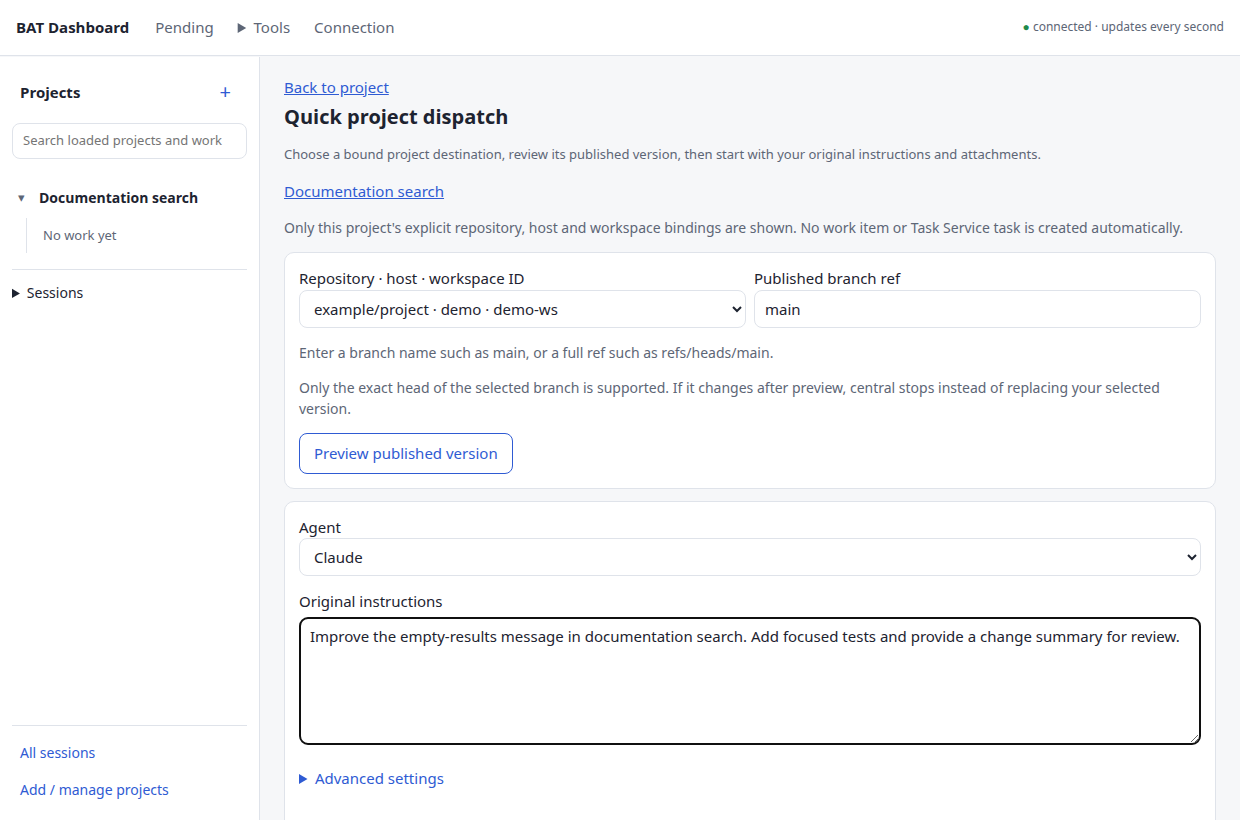
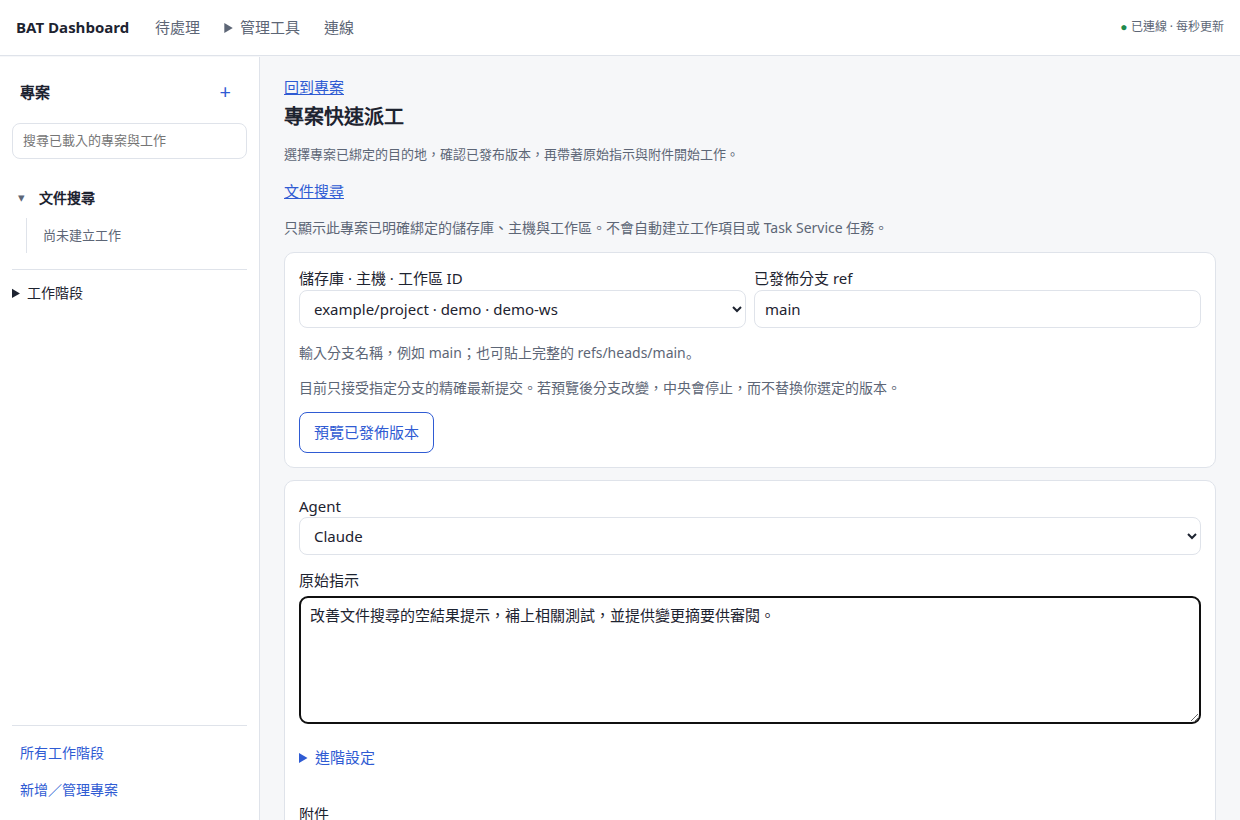
A persistent project tree keeps conversations, controls and linked results together in Web and Tauri.Web 與 Tauri 共用左側專案工作樹;選中工作,就能一起查看對話、操作與關聯成果。
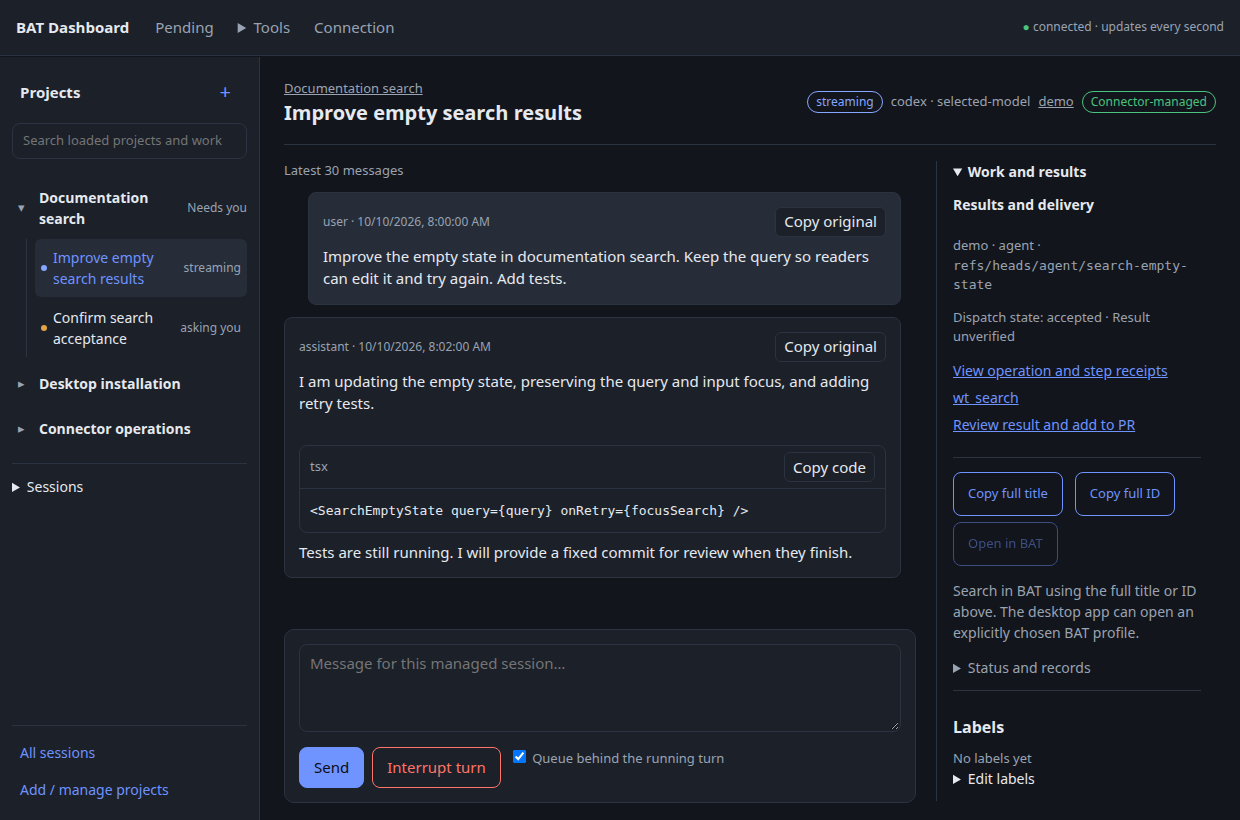
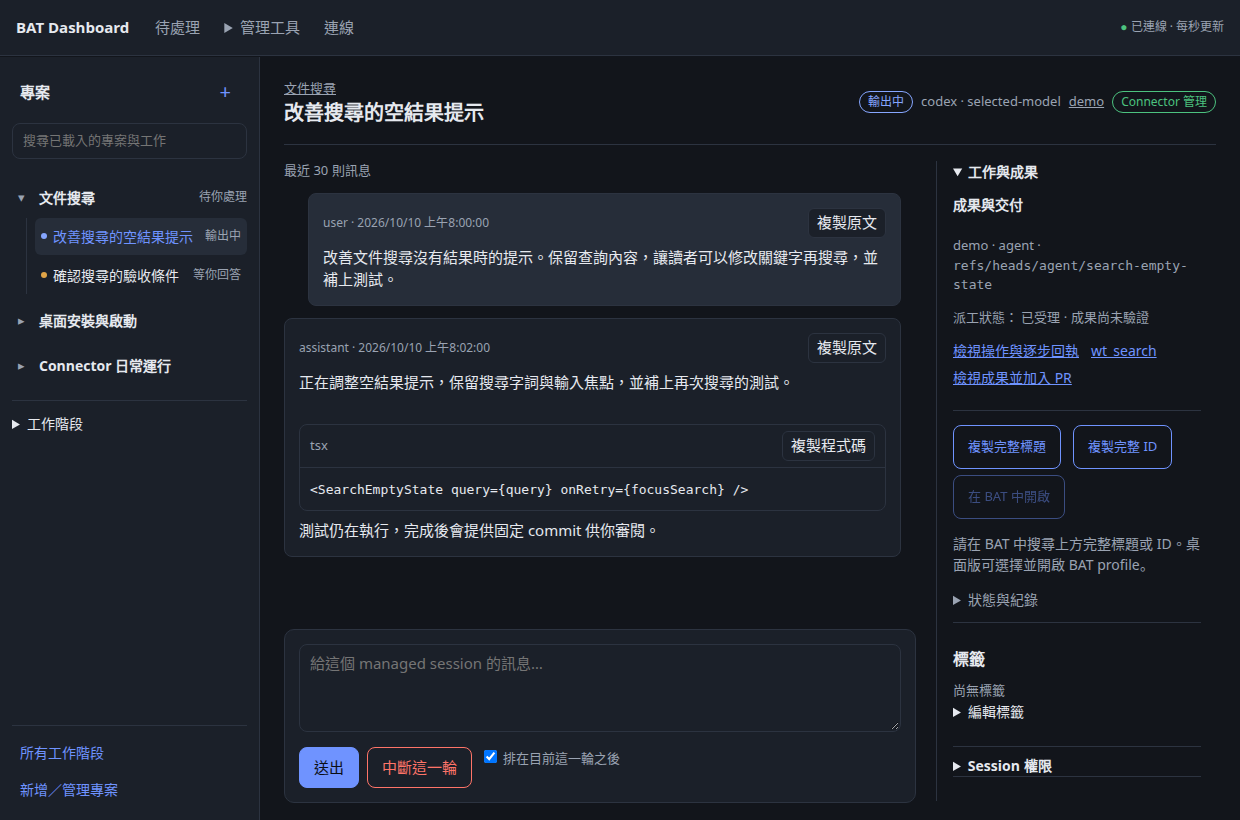
No output may mean waiting, idle or missing observations.沒有輸出可能是等待、閒置,或缺少觀測。
Accepting work, merging a PR and verifying a deployment have separate receipts.接受成果、合併 PR 和驗證部署,各有自己的回執。
Saved operation identities let you recover without guessing or dispatching twice.保存操作身分,先查回結果,避免猜測或重複派工。
From request to result從需求到成果
Keep the intent, execution and delivery together. Work stays on the selected BAT host, whichever client you use.需求、執行與交付保留關聯。無論從哪個入口操作,工作留在你選定的 BAT 主機。
Record the original request, acceptance criteria and explicitly associated repository.保留原始需求、驗收條件,明確連結 repository。
Choose the host and workspace. Review a fixed branch commit, then add instructions, a model and exact attachments.選主機與工作區,檢視分支的固定 commit,加入指示、模型與精確附件版本。
Read the conversation, answer a pending question and find the session or worktree from its project.讀取對話、回答待處理問題,從原專案找回 session 與 worktree。
Review fixed candidate commits in a separate integration workspace and bring selected results into one PR.在獨立整合工作區檢視固定候選 commit,把選定成果送進同一個 PR。
Merge the reviewed PR scope. A configured deployment recipe checks the actual version and runtime evidence.合併已檢視的 PR 範圍;有部署 recipe 時,核對實際版本與 runtime 證據。
Preview eligible cleanup, see why resources are retained and keep their history available.先預覽可整理的資源、了解保留原因,整理後仍可查歷史。
Across hosts, code travels through an explicitly bound GitHub repository and a published commit. Human checkouts and unpublished workspaces are not silently moved.跨主機程式碼透過明確綁定的 GitHub repository 與已發布 commit 取得;不默默搬動人的 checkout 或未發布工作區。
The working surface日常工作所需
Hierarchy, pins, archive, original requests and acceptance criteria keep long-running work understandable.以階層、釘選、封存、原始需求和驗收條件,整理持續進行的工作。
Read the guide →閱讀說明 →Readable code and tables, copying, preserved reading position and authorized session actions.閱讀程式碼與表格、複製原文、保留閱讀位置,並執行已授權的 session 操作。
Read the guide →閱讀說明 →Capture and review immutable revisions; keep the operation or task that produced each result.擷取、審閱不可變版本,保留每份成果的 operation 或 task 來源。
Read the guide →閱讀說明 →Fixed integration previews, PR actions, deployment history, version checks and supported rollback recipes.固定整合預覽、PR 操作、部署歷史、版本驗證與已支援的 rollback recipe。
Read the guide →閱讀說明 →Stable IDs, resource relations and saved receipts retain context across refreshes and disconnects.以穩定 ID、資源關聯及回執,在刷新與斷線後保留脈絡。
Read the guide →閱讀說明 →CLI and MCP share central permissions. Hermes and Grokbot use adapters from the canonical skill.CLI 與 MCP 共用中央權限;Hermes/Grokbot 使用由共用 skill 產生的配接。
Read the guide →閱讀說明 →Connections, control and execution連線、中央控制與執行
Windows startup and native resources remain part of the product. Projects organize work across this system; they do not replace it.Windows 啟動與原生資源一直是產品的一部分。專案管理把這些工作整理起來,並沒有取代底下的系統。
Owns selected SSH tunnels, route/readiness checks, BAT profile windows and sign-in startup. Rust or the existing PowerShell backend; one proven owner. Provides connection paths to BAT / central and optional configured central bootstrap.管理選定 SSH tunnels、路由/就緒檢查、BAT profile 視窗與登入啟動。Rust 或既有 PowerShell backend 共用唯一 owner 規則;提供 BAT/中央連線,並支援已配置的中央 bootstrap。
↓ bat-remote/v2 and governed operations ↓↓ bat-remote/v2 與受控操作 ↓
You code through BAT desktop / mobile. Connector reads; continuation creates separate managed resources.你透過 BAT desktop/mobile coding。Connector 保持唯讀;接續時建立另一份 managed 資源。
Central dispatches work into the selected host. Fixed results retain their session, worktree and operation links.中央派工到選定主機;固定成果保留 session、worktree 與 operation 關聯。
Central governs each delivery step and retains receipts.每個交付步驟由中央管理並保存回執。
Web and Tauri use desktop/src and the same central state. Windows-native Fleet stays on Windows; Mac Dashboard support is not a Fleet port. Drafts and conversation position remain local to each client.Web 與 Tauri 使用 desktop/src 及同一中央資料。Windows 原生 Fleet 保留在 Windows;支援 Mac Dashboard 不等於 Fleet 已移植。草稿與對話位置仍各入口獨立保存。
The candidate prepares one owned local central and personal identity. Reopen and safe upgrade preserve its journal; joining an existing central stays explicit, and connection failure never creates a replacement database.候選版準備一套自有本機中央與個人身分,重開和安全升級沿用原帳本。加入既有中央仍須明確選擇,連線失敗不會另造資料庫。
Windows Fleet & resourcesWindows Fleet 與資源
Windows Fleet retains its connection, profile and startup controls alongside the candidate bundled central. Fleet configuration and central onboarding have separate responsibilities.Windows Fleet 的連線、profile 與啟動控制,和候選打包中央一起保留。Fleet 配置與中央引導設定各有分工。
Selected SSH tunnels, Tailscale status, configured route fallbacks and bounded recovery. Readiness checks TLS / BAT / central, not just an open port.選定 SSH tunnels、Tailscale 狀態、已配置的備援路由與有次數上限的復原;就緒檢查涵蓋 TLS/BAT/中央,不只看 port。
Implementation guide →實作說明 →Choose connections, BAT profiles and Dashboard independently. Preview prerequisites, keep the login picker or use saved launch choices.背景連線、BAT profiles 與 Dashboard 獨立選擇;預覽必要連線,保留登入選擇器或使用已保存的啟動選項。
Implementation guide →實作說明 →New Rust installations use public configuration examples without external Fleet scripts. Existing PowerShell owners retain explicit migration and stop proof.新 Rust 安裝使用公開設定範例,不需外部 Fleet scripts。既有 PowerShell owner 仍須明確遷移並證明正常停止。
Implementation guide →實作說明 →Open the installed Tailscale app for sign-in. A separately configured fixed SSH bootstrap recipe can query / start the selected central service.可開啟已安裝的 Tailscale 程式完成登入;另以已配置的固定 SSH bootstrap recipe 查詢/啟動指定中央服務。
Implementation guide →實作說明 →Credential Manager, native files and tray controls also remain. No private inventory or host configuration is published here.Credential Manager、原生檔案與系統匣控制也保留;這裡不公開私人 inventory 或主機設定。
Candidate installation候選安裝流程
Install the matching candidate package. It prepares the Python runtime, private local central and personal identity; you authorize BAT and GitHub in Settings.安裝相符候選包後,程式準備 Python runtime、私人本機中央與個人身分,再由你於設定中授權 BAT 與 GitHub。
A matching runtime, private data and personal identity, managed by the application.由程式管理相符 runtime、私人資料與個人身分。
Guided BAT access and GitHub authorization, with clear host and workspace choices.引導完成 BAT 存取與 GitHub 授權,明確選主機和工作區。
A background Connector that reconnects, with one click from the tray / menu bar to open the Web Dashboard.Connector 背景常駐並自動重連;從系統匣/選單列點一下開 Web Dashboard。
Open the desktop workflow on main, choose a successful run from the current public history, and match the source commit and installed-fixture records. Wait if its platform job is still building. External central setup remains an advanced option.開啟 main 的 desktop workflow,選目前公開歷史的成功 run,核對來源 commit 與安裝 fixture 紀錄;若平台 job 還在建置,請等成功。外部中央設定仍是進階選項。
Choose your entry point選擇使用入口
Candidate packages bundle central; local Fleet capabilities and credential adapters still depend on platform.候選包包含中央;本機 Fleet 能力與憑證 adapter 仍依平台提供。
| Entry入口 | Available已有內容 | Current boundary目前界線 |
|---|---|---|
| WebWeb | Shared Dashboard with managed browser sign-in共用 Dashboard 與 managed 瀏覽器登入 | Trusted loopback / tunnel; external central login remains available.可信 loopback/tunnel;保留外部中央登入。 |
| Windows x64Windows x64 | NSIS with bundled central, private storage, Fleet and Credential ManagerNSIS 包含中央、私人儲存、Fleet 與 Credential Manager | Unsigned validation package; match its source commit to the successful platform job.未正式簽署的驗證包;來源 commit 須與成功的平台 job 相符。 |
| Mac Apple Silicon / IntelMac Apple Silicon/Intel | DMGs with bundled central, menu bar and KeychainDMG 包含中央、選單列與 Keychain | Ad-hoc validation signing; notarization / production updates excluded; no Windows Fleet port.採 ad-hoc 驗證簽署;公證/正式更新已排除,沒有 Windows Fleet 移植。 |
| LinuxLinux | Debian package with bundled centralDebian 包含中央 | External-central native credentials remain memory-only; persistent vault excluded.外部中央的原生憑證仍只留記憶體;持久 vault 已排除。 |
| Central service中央服務 | Python authority with Windows and POSIX private storage / locksPython 中央權威,支援 Windows/POSIX 私人儲存與檔案鎖 | Bundled with desktop; manual operator deployment remains available.隨桌面打包;仍可由操作者手動部署。 |
Packages are GitHub Actions artifacts: sign-in may be required and downloads expire. They are not a stable signed release / update channel. The setup guide explains how to identify the correct package and commit.目前套件是 GitHub Actions artifacts,可能需要登入且下載會到期,不是穩定的簽章發行/更新通道。指南說明如何核對套件與 commit。
Trust the information讓資訊值得信任
Connector treats human-created sessions and worktrees as read-only. Continuation uses new managed resources; unknown ownership needs creation evidence.Connector 對人工 session 和 worktree 保持唯讀;接續使用新的 managed 資源,unknown 歸屬須有建立證據。
Host gates and API scopes both apply. MCP, CLI and Dashboard share central actions, version checks and audit records.Host 開關與 API scopes 同時生效;MCP、CLI、Dashboard 共用中央操作、版本檢查及稽核。
A timeout is not proof that nothing happened. Recover the original operation instead of clearing reservations or repeating an uncertain write.逾時不表示什麼都沒發生。查回原操作,不清掉 reservation 或重送結果未知的寫入。
Connector policy does not sandbox an agent process. Unattended use also needs verified host accounts, directory protection and confinement.Connector 政策不等於 Agent process 的 sandbox;無人值守還需驗證主機帳號、目錄保護與 confinement。
Readiness, with evidence交付現況與證據
Current public source · source, package validation and release assets are recorded separately.目前公開原始碼 · 原始碼、套件驗證與 release 資產分開記錄。
Read at the right depth依需要深入
Connections, BAT profiles, login, Tailscale, backend migration and native resources.連線、BAT profiles、登入、Tailscale、backend 遷移與原生資源。
First launch, BAT / repository setup, verification commands and recovery.首次啟動、BAT/儲存庫設定、驗證命令與恢復。
Shared decisions, Web / Tauri and the managed installation requirement.共用決策、Web/Tauri 與 managed 安裝要求。
Published commits, destinations, attachments and operation recovery.已發布 commit、目的地、附件及操作復原。
Integration previews, merge scope, deployed versions and rollback limits.整合預覽、merge 範圍、部署版本與 rollback 限制。
Canonical skills and matching Hermes / Grokbot adapters.共用 skills 與同版 Hermes/Grokbot 配接。
Build the shared frontend, run checks and understand the repository.建置共用前端、執行檢查及了解 repo。
A few practical questions常見問題
No. Dashboard can manage work on a configured remote BAT host. BAT remains where the coding sessions run. Local BAT launch and Fleet controls are optional platform capabilities.不必。Dashboard 可管理已配置遠端 BAT 主機的工作,coding sessions 留在 BAT。開本機 BAT 與 Fleet 控制是依平台提供的選用能力。
A matching candidate package prepares its local runtime, background central, private data and personal identity. You still confirm BAT trust, account authorization and exact host/workspace bindings; SSH access must already be configured for Git work.相符候選包準備本機 runtime、背景中央、私人資料與個人身分。BAT 信任、帳號授權及精確 host/workspace 綁定仍由你確認;Git 工作所需 SSH 存取須先配置。
Yes. They use the same central state and frontend source. Local drafts are independent; native credentials, Fleet and window controls are platform-specific.可以。共用中央狀態與前端來源;草稿各自保存,原生憑證、Fleet 和視窗控制依平台提供。
Connector operations keep human resources read-only and use managed work for agents. OS-level access is a separate host-account and confinement concern; the Dashboard is not itself an OS sandbox.Connector 操作對人工資源唯讀,Agent 使用 managed 工作區。OS 層的存取另由主機帳號與 confinement 決定,Dashboard 本身不是 OS sandbox。
Automated fixtures cover controlled setups. The user decides readiness for their own hosts, accounts and deployment targets and performs real-environment acceptance. The candidate does not claim that those checks have already passed.自動 fixture 驗證受控環境;使用者自行判斷其主機、帳號與部署目標的就緒程度並執行實際驗收。候選版不宣稱那些檢查已通過。
No. This is an unofficial MIT-licensed companion. Better Agent Terminal is by TonyQ and contributors. Project Hub informs selected UI patterns; no Hub importer or runtime dependency is included.不是。這是 MIT 授權的非官方 companion;BAT 由 TonyQ 與貢獻者開發。部分 UI 參考 Project Hub,沒有 Hub importer 或 runtime 依賴。