Token usage dashboard · Companion charactersToken 用量儀表板 · 陪伴角色

Check today's tokens with your AI sisters.

今天的 token,AI 姊妹陪你看。

A pinned TokenTracker sidecar reads Claude Code, Codex, Gemini CLI, and Grok Build usage on your own machine. TokenMonster turns it into a local dashboard, and eleven companions unlock from real usage milestones. No account, no telemetry.

鎖定版本的 TokenTracker sidecar 在你自己的電腦上讀取 Claude Code、Codex、Gemini CLI 與 Grok Build 的用量,TokenMonster 再把它整理成本機儀表板,11 位陪伴角色隨真實的使用里程碑解鎖。不用帳號,沒有遙測。

MITTypeScript · Electron 43Local-first, works offline本機優先,離線可用
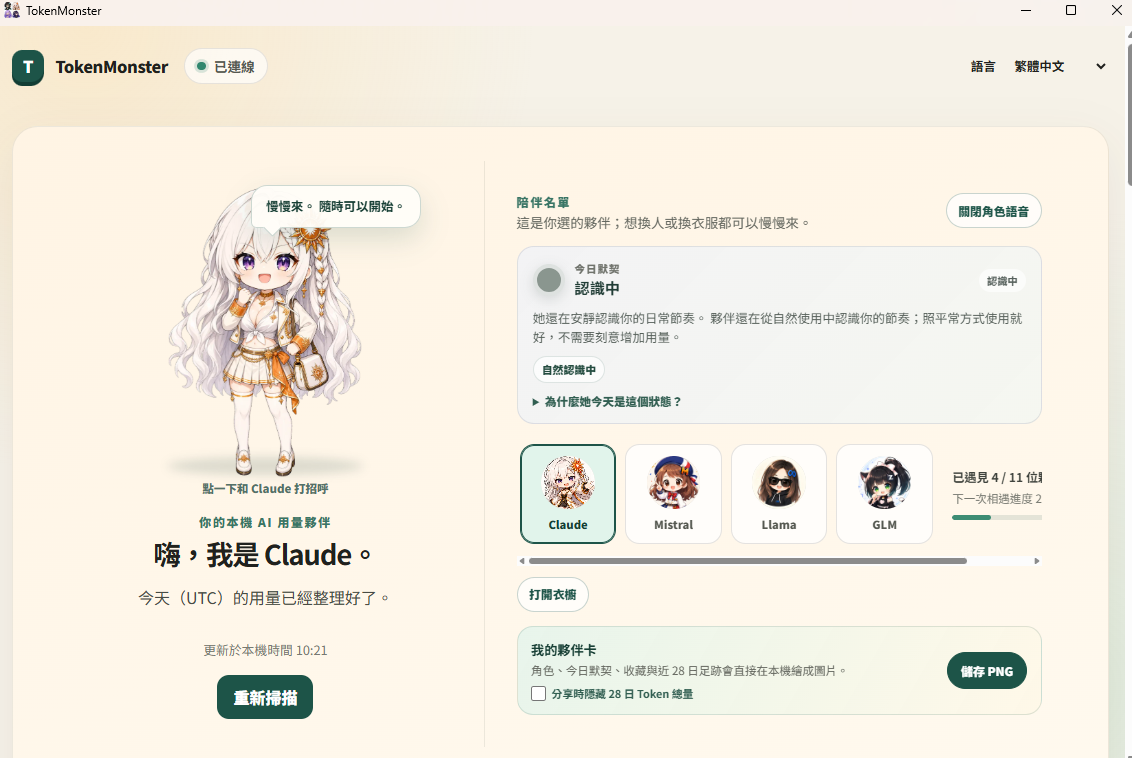
TokenMonster dashboard on Windows in Traditional Chinese: Claude on the left, today's connection card still learning the user's rhythm, the companion roster with 4 of 11 met, and the companion card panel with a Save PNG button
The Windows desktop build. Characters and numbers come from local data.Windows 桌面版實機畫面,角色與數字都來自本機資料。
rc.22Latest test build, July 2026最新測試版,2026 年 7 月
11Companion characters陪伴角色
4CLI tools tracked追蹤的 CLI 工具
20Outfit themes per character每位角色的服裝主題
Why it exists為什麼做這個

Usage numbers are easy to collect and easy to ignore.

用量數字好收集,也很容易被忽略。

Claude Code, Codex, Gemini CLI, and Grok Build each keep their own usage records on your machine. Adding them up takes a collector; opening the total every day takes a reason. TokenMonster pairs a local collector with characters who react to your day, and keeps both on your machine.

Claude Code、Codex、Gemini CLI 與 Grok Build 都會在你的電腦上留下各自的用量紀錄。要加總,需要收集工具;要每天打開來看,需要一點理由。TokenMonster 把本機收集器和角色放在一起:角色會依你當天的用量給反應,而且兩者都只在你的電腦上執行。

Tokens are measurements, not game currency.
Token 是量測值,不是遊戲貨幣。
How it works運作方式

Start, scan, meet, grow.

啟動、掃描、相遇、成長。

Start the desktop app or the CLI. Everything after that happens on your machine.

啟動桌面版或 CLI,之後的一切都在你的電腦上進行。

01

Start it

啟動

The desktop app lives in the system tray. The CLI starts a gateway on 127.0.0.1 and opens the dashboard through a one-time link; on a remote machine it can print the SSH tunnel command instead.

桌面版待在系統匣。CLI 會在 127.0.0.1 啟動 gateway,用一次性連結開啟儀表板;在遠端機器上,也可以改成印出 SSH 通道指令。

02

Scan local usage

掃描本機用量

The TokenTracker sidecar reads the usage records your CLIs already keep. TokenMonster accepts only totals that reconcile, and shows missing days as unavailable instead of zero.

TokenTracker sidecar 讀取各家 CLI 本來就留下的用量紀錄。TokenMonster 只接受對得上帳的總量,缺資料的日子會標成無法取得,不會當成零。

03

Meet your first sister

遇見第一位姊妹

Draw a card to see whether ChatGPT, Claude, Gemini, or Grok shows up, or pick one yourself. If one provider clearly leads your last 28 days, its sister is suggested. Switching later costs no tokens.

抽一張卡,看看 ChatGPT、Claude、Gemini、Grok 誰會來到你身邊,也可以自己挑。近 28 天如果有一家用量明顯最多,會推薦對應的姊妹。之後換人不需要多用 token。

04

Unlock from milestones

依里程碑解鎖

Seven friends unlock from provider totals, lifetime totals, active-day streaks, and how many providers you use. Each character also has 20 outfit themes that open as usage grows.

七位朋友依各家累積量、總用量、連續活躍天數,以及用過幾家 provider 解鎖。每位角色另有 20 套服裝主題,隨用量成長逐步開放。

Unlocks aren't a purchase

解鎖不是買來的

The thresholds are local measurements. A later rescan does not lock anyone again.

門檻看的是本機量到的數字。之後重掃,不會把人鎖回去。

  1. Family totals

    Each sister unlocks at 1 token. DeepSeek needs 100,000, and Qwen needs 250,000.

  2. Streak or total

    Mistral needs 3 active days in a row. Llama needs 500,000 lifetime tokens.

  3. Provider count

    Sakana unlocks once four providers have local usage.

  4. Local unlock

    A draw or your own pick selects the first sister, even when usage is still zero.

  • sisters open at 1 token
  • friends wait on milestones
  • a rescan does not lock
A 28-day leader is only a hint. You still draw or pick.
  1. 各家用量

    姊妹用到第 1 個 token 就解鎖。DeepSeek 要 10 萬,Qwen 要 25 萬。

  2. 連續或總量

    Mistral 要連續 3 天。Llama 要終身 50 萬 token。

  3. 用過幾家

    Sakana 要四家 provider 都有本機用量,才解鎖。

  4. 本機解鎖

    抽卡或自己選,就算用量還是 0,也會決定第一位姊妹。

  • 姊妹 1 token 就開
  • 朋友要看里程碑
  • 重掃不會鎖回去
近 28 天領先的那一家只是提示。第一位還是你抽,或你挑。
What you get你會得到什麼

Usage, companions, no cloud.

用量、角色,都不靠雲端。

Every view is computed on your machine. TokenMonster keeps aggregate counts only, and the interface comes in Traditional Chinese and English.

每個畫面都在你的電腦上算出來。TokenMonster 只保存彙總後的數字,介面有繁體中文與英文。

01

Today, 7 days, 28 days

今天、7 天、28 天

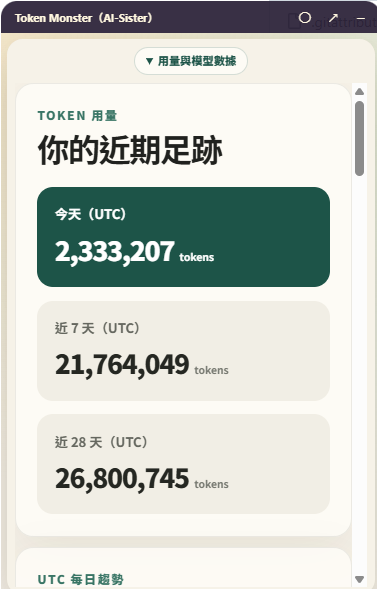
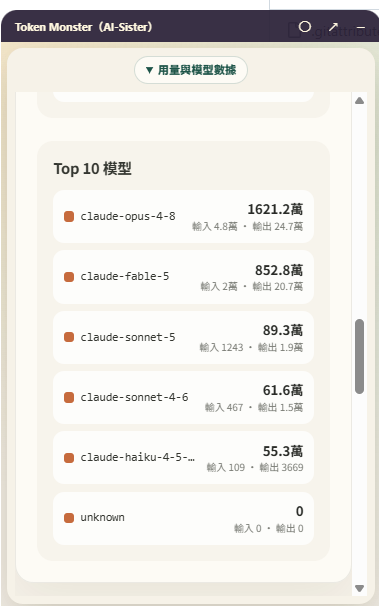
Totals across the four tools, a daily UTC trend, a per-provider breakdown, a Top 10 model list, and a remaining-quota estimate for the plan you pick (community figures, not official limits).

四套工具的合計用量、UTC 每日趨勢、各家 provider 分析、Top 10 模型排行,以及依你選的方案估算的剩餘額度(社群估計值,不是官方上限)。

packages/companion-ui
02

Eleven companions

11 位陪伴角色

Four sisters (ChatGPT, Claude, Gemini, Grok) and seven friends (DeepSeek, Qwen, Mistral, Llama, Sakana, Perplexity, GLM). Unlock rules are local and explainable, and an unlock is never taken back.

四位姊妹(ChatGPT、Claude、Gemini、Grok)與七位朋友(DeepSeek、Qwen、Mistral、Llama、Sakana、Perplexity、GLM)。解鎖規則在本機計算、說得清楚,解鎖了就不會收回。

packages/characters
03

Today's connection

今日默契

A daily read of your usage rhythm from the last 28 days. While it is still learning, it says so and tells you there is no need to use more.

依近 28 天的使用節奏,每天給一段側寫。還在認識你的時候會直接說明,並提醒你不需要刻意多用。

character-profile.ts
04

Companion card

夥伴卡

Save a PNG of your character, today's connection, and collection, drawn on your machine. You can hide the 28-day token total before saving.

把角色、今日默契與收藏在本機畫成一張 PNG。存檔前可以選擇隱藏 28 天 token 總量。

share-card.ts
05

Desktop pet

桌面寵物

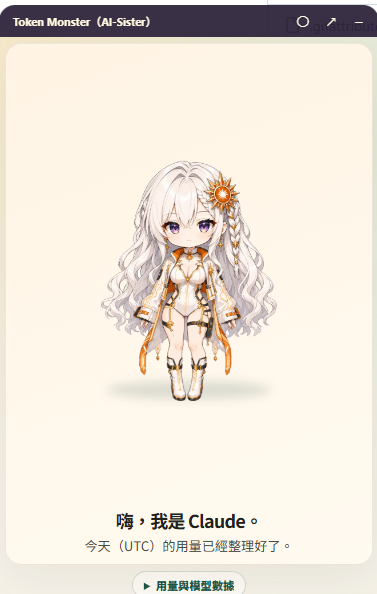
On Windows, a small pet window you can drag, pin on top, or hide to the tray. Usage and the model ranking fold out below the character.

Windows 上有一個小寵物視窗,可以拖曳、置頂或收進系統匣。用量與模型排行就收在角色下方,展開就看得到。

apps/companion
06

Optional chat, your key

選用聊天,自備 key

Bring your own OpenAI key to talk with the pet. Requests go straight to the OpenAI Responses API with store set to false, and the key is either encrypted with Electron safeStorage or held in memory only.

想跟寵物聊天,可以自備 OpenAI API key。請求直接送到 OpenAI Responses API,並設定 store: false;key 用 Electron safeStorage 加密保存,或只放在記憶體。

packages/byok-openai
Ids, not model names

認 id,不認模型名

Each CLI has one source id. The adapter will not swap in a model name.

四套 CLI 各有一個來源 id。adapter 不會拿模型名稱來代替。

  1. Claude Code

    Claude Code usage is filed under anthropic.

  2. Codex CLI

    Codex usage is filed under openai.

  3. Gemini CLI

    Gemini CLI usage is filed under google.

  4. Grok Build

    Grok Build usage is filed under xai.

  5. Map sources

    An id the map does not name is rolled into other. A model name never becomes the provider.

  • four CLIs, four ids
  • no guess from a model name
  • unknown ids go to other
Those ids are the ones the pinned TokenTracker response already uses.
  1. Claude

    Claude Code 的用量,記在 anthropic 底下。

  2. Codex

    Codex 的用量,記在 openai 底下。

  3. Gemini

    Gemini CLI 的用量,記在 google 底下。

  4. Grok

    Grok Build 的用量,記在 xai 底下。

  5. 來源對照

    對照表沒有的 id 算進 other。模型名稱不會變成 provider。

  • 四套 CLI,四個 id
  • 不從模型名稱猜
  • 不認識的放進 other
這四個 id,就是鎖定的 TokenTracker 回應裡本來用的名字。

This bar is a guess

這條是估的

You pick the plan. The percent is not that provider's official cap.

方案是你選的。這個百分比不是那家 provider 的官方上限。

  1. Pick a plan

    The rows are Anthropic, OpenAI, Google, and xAI. Nothing is selected for you.

  2. Estimate

    The bar compares used tokens with that plan's community budget.

  3. Used tokens

    The used number is the local total that already reconciled, inside that plan's window.

  • you pick the plan
  • budget is a community figure
  • not an official cap
Every budget in the local catalog is marked as an estimate, not a contractual allowance.
  1. 自選方案

    列出來的是 Anthropic、OpenAI、Google、xAI。程式不會幫你選。

  2. 估算額度

    長條比的是已用 token,和那個方案的社群預算。

  3. 已用 token

    已用的數字,是這個方案時間窗裡,本機已經對過帳的總量。

  • 方案你自己選
  • 預算是社群數字
  • 不是官方上限
本機目錄裡的每一筆預算都標明是估計,不是合約上的額度。
Screens實機畫面

The Windows pet window.

Windows 寵物視窗。

Captured from the Windows desktop build in its Traditional Chinese interface. Usage and rankings come from local data.

擷取自 Windows 桌面版的繁體中文介面,用量與排行都來自本機資料。

Claude in the TokenMonster pet window, saying today's UTC usage is ready
Claude in the pet window寵物視窗裡的 Claude
Pet window usage panel: today 2,333,207 tokens, last 7 days 21,764,049, last 28 days 26,800,745, all in UTC
Today, 7-day, and 28-day totals (UTC)今天、近 7 天、近 28 天的用量(UTC)
Pet window Top 10 models list with total, input, and output tokens per model
Top 10 models with input and outputTop 10 模型與輸入、輸出量
Architecture系統架構

A gateway, a sidecar, local files.

一個 gateway、一個 sidecar,資料都在本機。

The dashboard talks only to the gateway, and only the gateway asks the sidecar for numbers. The sidecar runs with outbound network blocked.

儀表板只跟 gateway 溝通,也只有 gateway 會向 sidecar 要數字。sidecar 執行時完全不能對外連線。

Dashboard → gateway → sidecar儀表板 → gateway → sidecar
Dashboard儀表板Browser tab (CLI)瀏覽器(CLI)Desktop window and pet桌面版與寵物Opened by one-time link一次性連結開啟
Gateway127.0.0.1, random port127.0.0.1,隨機連接埠Usage, characters, chat用量、角色、聊天Reconciled totals only只收對得上帳的總量Progress in ~/.tokenmonster進度存在 ~/.tokenmonster
SidecarTokenTracker 0.80.0Reads CLI usage records讀取 CLI 用量紀錄Outbound network blocked封鎖對外連線
network-deny.cjs · TOKENTRACKER_NO_TELEMETRY=1 · store: false

The page never reads logs

頁面不直接讀紀錄

The dashboard asks the gateway. Only the gateway talks to the pinned sidecar.

儀表板只問 gateway。問 sidecar 的,也只有 gateway。

  1. CLI logs

    Claude Code, Codex, Gemini CLI, and Grok Build already keep usage on this computer.

  2. Sidecar

    TokenTracker 0.80.0 listens on loopback, with outbound calls blocked and telemetry off.

  3. Gateway

    A missing day, or a day whose total is 0, is unavailable. Any other day has to match its model breakdown.

  4. Dashboard

    The browser tab or the desktop window opens from a one-shot local link.

  • sidecar stays on loopback
  • a zero day stays blank
  • the page asks only the gateway
Raw usage JSON is read in memory and then dropped. What remains are the aggregates.
  1. CLI 紀錄

    Claude Code、Codex、Gemini CLI 和 Grok Build,用量本來就在這台電腦上。

  2. sidecar

    TokenTracker 0.80.0 只聽本機,對外連線被擋下,遙測也關掉。

  3. gateway

    少了某一天,或那天總量是 0,就當成沒有資料。其他日子要對得上模型明細。

  4. 儀表板

    瀏覽器分頁或桌面視窗,都從一次性的本機連結打開。

  • sidecar 只聽本機
  • 總量是 0 就不顯示
  • 頁面只問 gateway
原始用量 JSON 只在記憶體裡看過就丟。留下來的是彙總數字。
Design decisions設計取捨

Why it is built this way.

為什麼這樣做。

01

Wrap TokenTracker, do not fork it

包住 TokenTracker,不 fork

Finding tools, parsing changing log formats, and deduplicating records is TokenTracker's job. TokenMonster pins one exact version, runs it as a sidecar behind a narrow adapter (ADR 0005), and re-audits the output before moving to a new one.

找出工具、解析一直在變的紀錄格式、去除重複,都交給 TokenTracker。TokenMonster 鎖定單一版本,以 sidecar 跑在精簡的 adapter 後面(ADR 0005),要升級前先重新稽核它的輸出。

02

Character media is a separate, consented download

角色素材另外下載,要你同意

The install carries starter art for the four sisters and 168 text lines, and works offline. The full pack (891 images and 55 voice clips, about 73 MB) downloads only after you agree, is checked against SHA-256 digests, and can be repaired or removed. Voice is off by default.

安裝檔只帶四位姊妹的初始立繪與 168 條文字台詞,離線就能用。完整素材包(891 張圖與 55 段語音,約 73 MB)要你同意後才下載,逐一比對 SHA-256,也可以修復或移除。語音預設關閉。

03

Directory-local install, exact toolchain

裝在資料夾裡,版本鎖死

The CLI tarball installs into its own folder and carries a shrinkwrap, so the sidecar's dependencies cannot drift. A global npm install breaks on a bundled-dependency quirk, so it is not supported.

CLI 的 tgz 安裝在自己的資料夾裡,附帶 shrinkwrap,sidecar 的相依套件不會被升到沒審查過的版本。npm 全域安裝會碰到 bundled dependency 的問題,所以不支援。

You choose what leaves

要出去,得你點頭

Scans stay on this computer. Each way out waits for you.

掃描留在本機。往外的每條路,都等你自己打開。

  1. Local views

    Totals, charts, and characters are computed on this computer.

  2. Loopback only

    The gateway and the sidecar listen only on this computer. The sidecar starts with network calls blocked.

  3. Media pack

    The full image and voice pack downloads only after you agree, then the bytes are checked with SHA-256.

  4. Your API key

    The key stays on this computer, and chats ask the provider not to keep them.

  5. Update check

    Automatic checks start off. The desktop app looks for an update only after you turn that on.

  • scans stay here
  • the pack waits for a yes
  • chats ask not to be kept
  • This machine
  • Your choice
  • Outside
The contribution counter is in the code and off by default. Its service is not deployed, so this build sends no usage out.
  1. 本機畫面

    總量、圖表和角色,都在這台電腦上算。

  2. 只留本機

    gateway 和 sidecar 只聽本機。sidecar 啟動時,對外連線會被擋下。

  3. 素材包

    完整的圖和語音,要你同意才下載,再用 SHA-256 對一次。

  4. 自備金鑰

    金鑰留在這台電腦。聊天會請 provider 不要把內容留下來。

  5. 檢查更新

    自動檢查一開始是關的。桌面版要等你打開,才會去看有沒有更新。

  • 掃描不出這台電腦
  • 素材包等你同意
  • 聊天請對方不要留
  • 這台電腦
  • 你點頭
  • 外面
貢獻計數器寫在程式裡,預設關掉,服務也還沒部署。現在這個版本不會把用量送出去。
Start here從這裡開始

Installer or CLI. Pick one.

安裝檔或 CLI,選一種就好。

Both come from GitHub Releases as public test builds. The Windows installer is not code-signed yet. The CLI needs exactly Node.js 24.15.0 and npm 11.12.1, and it is not on the npm registry yet.

兩者都是 GitHub Releases 上的公開測試版。Windows 安裝檔還沒有程式碼簽章。CLI 只支援 Node.js 24.15.0 與 npm 11.12.1 這組版本,也還沒上架 npm registry。

Windows desktop app

Windows 桌面版

Run TokenMonsterSetup.exe. SmartScreen warns about the unsigned build: choose More info, then Run anyway. TokenMonster then sits in the tray and starts from the Start menu.

執行 TokenMonsterSetup.exe。因為還沒簽章,SmartScreen 會跳出警告,請按「其他資訊」,再按「仍要執行」。之後 TokenMonster 會待在系統匣,也可以從「開始」功能表啟動。

CLI on Windows, macOS, or Linux

CLI:Windows、macOS、Linux

Download the .tgz and check it against TokenMonster-cli-SHA256SUMS.txt. Install it into its own folder, not globally.

下載 .tgz,並用 TokenMonster-cli-SHA256SUMS.txt 核對。請安裝到獨立的資料夾,不要全域安裝。

mkdir tokenmonster-app
cd tokenmonster-app
npm i ../tokenmonster-0.1.0-rc.22.tgz
npx tokenmonster

On a remote machine

在遠端機器上

Skip the browser and the CLI prints the matching ssh -L command. Run it on your own computer, then open the printed link.

不開瀏覽器時,CLI 會印出對應的 ssh -L 指令。在你自己的電腦上執行它,再打開印出的連結。

npx tokenmonster --no-open

Install, then you pick

裝好,再自己挑

rc.22 is a public test build. The Windows installer is unsigned.

rc.22 是公開測試版。Windows 安裝檔還沒有簽章。

  1. Get the build

    The setup and the CLI tarball are on GitHub Releases. TokenMonster itself is not on npm yet.

  2. Start sidecar

    The desktop app or the CLI starts TokenTracker 0.80.0 and waits until it is ready.

  3. Open the page

    The one-shot bootstrap link sets a session cookie. Later requests use that cookie.

  4. Pick a sister

    You draw or pick ChatGPT, Claude, Gemini, or Grok.

  • public test build rc.22
  • sidecar must be ready
  • you choose the sister
With --no-open it prints an ssh tunnel command instead of opening the browser.
  1. 取得建置

    安裝檔和 tarball 在 GitHub Releases。TokenMonster 本身還沒上 npm。

  2. sidecar

    桌面版或 CLI 會拉起 TokenTracker 0.80.0,等到它就緒才繼續。

  3. 打開頁面

    一次性的 bootstrap 連結會設好 session cookie,之後的請求都靠它。

  4. 挑選姊妹

    你抽一張,或自己點 ChatGPT、Claude、Gemini、Grok。

  • 公開測試版 rc.22
  • sidecar 要先就緒
  • 姊妹由你來選
加上 --no-open 就不開瀏覽器,改印一條 ssh 通道指令。
Honest status誠實的現況

Where it stands.

目前的樣子。

A public test build. Development started in mid-July 2026, and rc.18 through rc.22 were published on July 22 and 23. On October 1, 2026, main received documentation, CI and dependency security updates, but no release newer than rc.22 has been published.

公開測試版。2026 年 7 月中開始開發,rc.18 到 rc.22 在 7 月 22 日與 23 日陸續發布。2026 年 10 月 1 日,main 收到文件、CI 與相依套件的安全更新,但還沒有發布比 rc.22 更新的版本。

Works today

目前可用

  • Windows installer with the tray pet and dashboard; CI installs, launches, and uninstalls it
  • Windows 安裝檔,含系統匣寵物與儀表板;CI 會實際安裝、啟動再移除
  • CLI tarball: the rc.22 release smoke test passed on Linux, macOS, and Windows
  • CLI 的 tgz:rc.22 的發行冒煙測試在 Linux、macOS、Windows 都通過
  • Usage from Claude Code, Codex, Gemini CLI, and Grok Build through TokenTracker 0.80.0
  • 透過 TokenTracker 0.80.0 讀取 Claude Code、Codex、Gemini CLI 與 Grok Build 的用量
  • Eleven characters, 168 starter lines, and an optional 946-file media pack
  • 11 位角色、168 條初始台詞,另有可選的素材包(946 個檔案)
  • Optional OpenAI chat in the desktop app, with your own key
  • 桌面版可選用 OpenAI 聊天,用你自己的 key
  • Launch skills for Codex and Claude Code that start the desktop app from a clone
  • 提供 Codex 與 Claude Code 用的啟動 skill,可以從 clone 下來的原始碼啟動桌面版

Limits and not yet

限制與尚未完成

  • The Windows installer is not code-signed, so SmartScreen warns on first run
  • Windows 安裝檔還沒有程式碼簽章,第一次執行時 SmartScreen 會警告
  • The desktop app is Windows-only; macOS and Linux get the CLI
  • 桌面版只有 Windows;macOS 與 Linux 目前只能用 CLI
  • The CLI accepts only Node.js 24.15.0 with npm 11.12.1 and is not on the npm registry
  • CLI 只支援 Node.js 24.15.0 搭配 npm 11.12.1,也還沒上架 npm registry
  • Updates are manual: automatic checks are off by default, and both update feeds returned 404 on 2026-10-01
  • 更新要手動下載:自動檢查預設關閉,而且 2026-10-01 查核時,兩個更新來源都回應 404
  • The opt-in contribution counter is in the code, but its service is not deployed
  • 選用的匿名貢獻計數器已經寫在程式裡,但服務端還沒部署
  • The complete dependency audit in CI reports no findings. The macOS DMG now comes from the system hdiutil, which removed electron-installer-dmg, appdmg and their image-size advisory, and @electron/packager 20.3.0 removed public extract-zip. The shipped-dependency audit passes too. On Windows, Unix mode checks are skipped because Windows has no POSIX modes and Node reports 0666 and 0777. The vault relies on the permissions of its folder. The desktop default is %APPDATA%\TokenMonster\secrets. A custom folder, set with Electron's --user-data-dir, must be private to the user. The CLI keeps the chat key in memory. Contribution files are written only when a credential host is injected, under .tokenmonster/contribution-v2 in HOME, or in the user profile home when HOME is unset. That directory must be private to the user too.
  • CI 的完整相依套件稽核沒有發現。macOS 的 DMG 改用系統內建的 hdiutil,electron-installer-dmg、appdmg 和它們帶來的 image-size 漏洞都拿掉了;@electron/packager 20.3.0 也不再帶入公開的 extract-zip。出貨相依套件的稽核同樣通過。Windows 沒有 POSIX 模式,Node 會回報 0666 與 0777,所以 Unix 模式檢查在 Windows 上略過。保險庫依賴它所在資料夾的權限。桌面版預設是 %APPDATA%\TokenMonster\secrets。若用 Electron 的 --user-data-dir 改位置,自訂資料夾必須只有該使用者能讀寫。CLI 的聊天金鑰只放在記憶體。只有另外接上 credential host 時,才會把貢獻憑證寫進 HOME 底下的 .tokenmonster/contribution-v2;沒有設定 HOME 時則寫在使用者主目錄。那個目錄也必須只有該使用者能讀寫。
Version版本
v0.1.0-rc.22
License授權
MIT; character art has separate termsMIT;角色美術另有授權
Stack技術
TypeScript · Electron 43 · TokenTracker
Platform平台
Windows app · CLI on Windows, macOS, LinuxWindows 桌面版 · CLI:Windows、macOS、Linux
Requires需求
Node.js 24.15.0 + npm 11.12.1 (CLI)CLI 需要 Node.js 24.15.0 + npm 11.12.1
Verified查核日期
2026-10-06

More from Ted Huang. Every public project has a page like this one, in English and Traditional Chinese.

Ted Huang 的其他作品。每個公開專案都有一頁像這樣的中英雙語介紹。

All projects →全部專案 →